How to Redeem Towers of Fortune Codes
Exact Shop path, troubleshooting, and tips so every string counts.
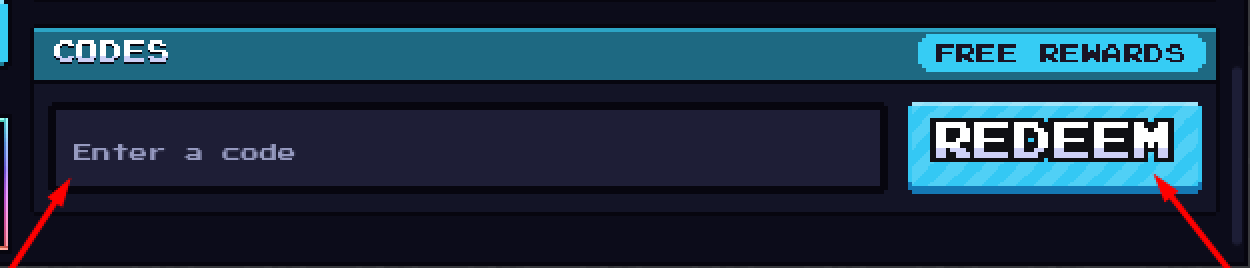
Redeeming codes in Towers of Fortune takes less than a minute once you know where the Shop hides the CODES panel. This walkthrough expands the quick steps from the Codes Hub with timing tips, case-sensitivity rules, and fixes for the errors new players hit most often. Keep the official place open: Towers of Fortune on Roblox.
Before you start
- Confirm you are in the real experience by 900 Pixels (Place ID
108114331578868). - Have the active list ready from Codes. As of November 2026 that means
Shutdown1(10 Lucky Spins + 5 Spins) andRelease(500 Coins). - Prefer redeeming in the lobby or between matches. Typing while balancing on a one-block bridge is how highlight-fail videos are born.
- Enable a stable connection. Soft disconnects sometimes delay reward toasts even when the redeem succeeded.
Step-by-step redeem path
- Launch the game and wait until the main HUD appears.
- Look at the bottom of the screen and open Shop.
- Inside Shop, select the CODES section (wording may show as a tab or button labeled CODES).
- Tap or click the text field that says to Enter a code.
- Type or paste the string exactly, including capital letters.
- Press REDEEM.
- Wait for the confirmation message and verify spins or coins updated.
Repeat for each unused code. You cannot stack duplicate redeems of the same string on one account.
Why casing matters
Towers of Fortune codes are case-sensitive. Shutdown1 is not the same as shutdown1 or SHUTDOWN1 if the live string was issued in mixed case. Always copy from the Codes Hub table rather than memorizing from a noisy video overlay. If a creator shows different casing, test the wiki spelling first, then the video spelling once—after that, stop guessing.
Best times to redeem
- Right after joining for the day, before your first serious match.
- After a shutdown or update, when new strings like
Shutdown1typically appear. Cross-check Patch Notes and the Updates Hub. - After claiming daily rewards so all freebies land in one ritual.
Avoid redeeming mid-fight. Even if the UI allows it, the camera and character still share your attention with void edges.
Troubleshooting
“Code invalid” / does nothing
- Recheck spelling and casing.
- Confirm the code is still listed as Active on Codes.
- Make sure there are no leading or trailing spaces from a mobile paste.
- Restart the experience once, then try again.
“Already redeemed”
- That account already claimed the reward. You will not get a second payout.
- If siblings share a device, verify which Roblox account is logged in.
Shop button missing or buried
- Hide overlapping menus.
- Leave a match to the lobby if the match HUD is customized differently.
- Recheck you are not in a wrong experience with a similar name—use Official Links.
Rewards not visible
- Reopen Shop and look at spins/coins counters.
- Soft rejoin once; delayed grants happen after lag spikes.
- If still missing after a confirmed success toast, note the time and check again after the next update rather than buying shady “restore” tools.
Mobile keyboard issues
- Paste when possible.
- Disable autocorrect for the code field if your keyboard rewrites
Shutdown1. - Rotate to landscape if the REDEEM button sits under the keyboard.
How codes fit the beginner journey
Codes are onboarding fuel. Pair them with:
- Getting Started for first-match habits
- Daily Rewards for recurring group freebies
- Guides Hub once your economy anxiety drops
Spins from Shutdown1 feed shop progression and cosmetics. Coins from Release cushion early sessions. Neither replaces practice on Bridging or How to Win, but both make practice less frustrating.
Safety notes while hunting codes
Never enter your Roblox password on a “code generator” site. Never download an executor because an ad promised auto-redeem. The Scripts Hub explains why those offers are dangerous and why this game still lacks verified dedicated scripts. Official redeem lives inside the Roblox experience Shop UI only.
Quick reference card
| Step | Action |
|---|---|
| 1 | Open Towers of Fortune (official place) |
| 2 | Shop (bottom) |
| 3 | CODES |
| 4 | Enter exact string |
| 5 | REDEEM |
| 6 | Confirm inventory/counters |
Related pages
- Codes Hub — active table and reward values
- Getting Started — what to do after redeeming
- Daily Rewards — group freebies
- Official Links — verify the real game
- Updates — when new code waves usually drop
Master this path once and every future shutdown code takes fifteen seconds. Then get back on a pillar and spend those rewards on better matches.
Frequently Asked Questions
Quick answers to the most common questions.
Where is the codes menu in Towers of Fortune?
Open Shop from the bottom of the screen, then select CODES. Enter the string and press REDEEM.
Do I need to redeem codes every match?
No. Each code is once per account. After a successful redeem, you never need that string again.
Can I redeem on mobile?
Yes. Use the same Shop → CODES path. Paste codes when possible and watch for autocorrect changing casing.
What if Shutdown1 fails?
Check exact casing, confirm it is still active on the Codes Hub, ensure you have not already redeemed it, then rejoin and retry.
Are code websites that ask for my password safe?
No. Only redeem inside the Roblox game Shop. Password forms outside Roblox are scams.